What Is SCORM? A Plain-English Guide for eLearning (2026)
Mario Cabral
Feb 11, 2026 • 9 min read
What SCORM is, how SCORM 1.2 and 2004 differ, why your LMS requires it, and how to create SCORM-compliant courses — explained in plain English for beginners.

Unlocking SCORM can feel like learning a new language—until you see how it streamlines content delivery, tracking, and reporting across virtually any modern LMS. This beginner-friendly guide explains what SCORM is, why it matters, and how to build and publish SCORM-compliant courses with confidence.
What Is SCORM—and Why Should You Care?
SCORM (Sharable Content Object Reference Model) is a set of eLearning standards that ensures your course content can launch, communicate, and report learner progress in any SCORM-compliant Learning Management System (LMS). In practice, it solves a universal challenge: how to package and track online training consistently across different platforms.
- Interoperability: Build a course once and use it in multiple LMSs without rewriting it.
- Tracking: Capture completion, scores, time spent, and quiz interactions.
- Portability: Distribute a single .zip file (the SCORM package) that contains everything your LMS needs to run the course.
- Scalability: Standardized packages make it easier to maintain large training catalogs across departments, clients, or schools.
The Building Blocks of SCORM
SCORM brings together three core ideas. Understanding these will help you troubleshoot issues and design content that tracks correctly.
- Content Packaging: Your course is zipped with an imsmanifest.xml file that lists all learning assets and how they’re organized.
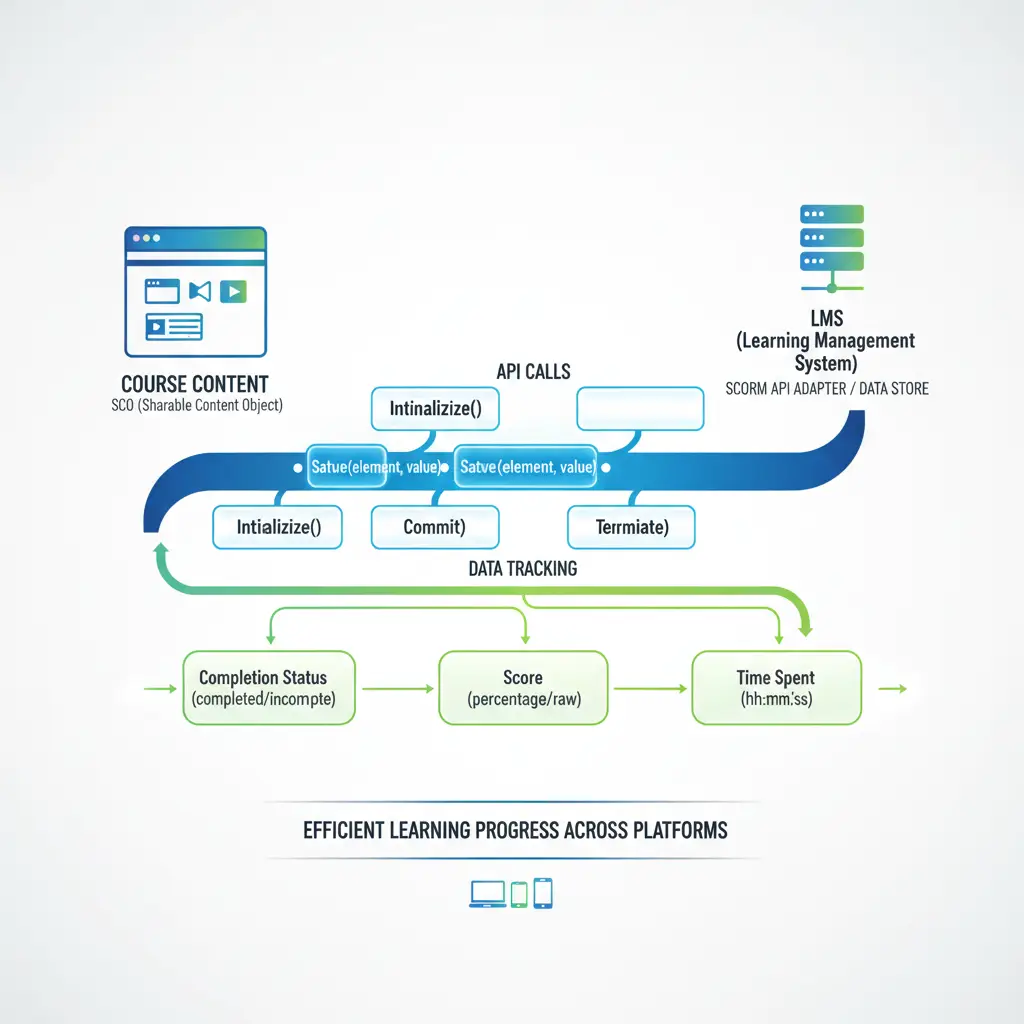
- Run-Time Communication (API): When a learner launches your course, it connects to the LMS using a JavaScript API to send/receive data (SetValue, GetValue, Commit, etc.).
- Sequencing & Navigation (SCORM 2004): Defines rules for how learners move through content (e.g., must pass Module 1 before unlocking Module 2).
Key Terms You’ll See
- SCO (Sharable Content Object): The smallest unit of content that can communicate with the LMS (e.g., a module or lesson).
- Asset: Media or pages that don’t talk to the LMS directly.
- Manifest: The imsmanifest.xml configuration file that maps out your course.
- Data Model Elements: Standard fields like cmi.core.lesson_status (SCORM 1.2) or cmi.completion_status (SCORM 2004).
SCORM 1.2 vs SCORM 2004: What’s the Difference?
Choosing the right version depends on the LMS you use and the complexity of your tracking needs.
| Feature | SCORM 1.2 | SCORM 2004 |
|---|---|---|
| Status Tracking | cmi.core.lesson_status (passed, failed, completed, incomplete, browsed, not attempted) | cmi.completion_status and cmi.success_status (separate completion vs pass/fail) |
| Suspend Data Limit | ~4,096 characters | ~64,000 characters |
| Sequencing Rules | Limited | Robust sequencing & navigation engine |
| Score Reporting | cmi.core.score.raw (+ min/max optional) | cmi.score.raw, cmi.score.min, cmi.score.max |
| Adoption | Very widespread | Common, especially in enterprise and government |
- Quick guidance: If your LMS supports both, choose SCORM 2004 when you need complex branching, separate completion/success tracking, or large saved state. For straightforward compliance training, SCORM 1.2 often suffices.
How SCORM Communicates with the LMS (In Plain English)
When a learner opens a module, your content initializes the SCORM API and starts sending messages like: “The learner scored 85,” “They completed page 5,” or “Mark the course as completed.”
Common Run-Time Calls
- Initialize / LMSInitialize: Start the communication session
- SetValue: Send data (e.g., set the score or location)
- GetValue: Read data (e.g., get the learner’s name or previous location)
- Commit: Save data to the LMS
- Terminate / LMSFinish: Close the session cleanly
javascript
API_1484_11.Initialize("");
API_1484_11.SetValue("cmi.location", "slide-3");
API_1484_11.SetValue("cmi.score.raw", "85");
API_1484_11.SetValue("cmi.completion_status", "completed");
API_1484_11.SetValue("cmi.success_status", "passed");
API_1484_11.Commit("");
API_1484_11.Terminate("");
What’s Inside a SCORM Package?
Every SCORM package is a .zip containing your HTML/JS/CSS, media files, and a single imsmanifest.xml. The manifest describes the organization, resources, and SCOs.
Minimal manifest example:
xml
-
Introduction
SCORM vs xAPI vs cmi5: When to Use Which
- SCORM (1.2/2004)
- xAPI (Tin Can API)
- cmi5
If your organization relies on a SCORM-friendly LMS and standardized reporting, SCORM remains the fastest path to dependable training analytics.
Step-by-Step: How to Implement SCORM in Your Courses
Follow these steps to move from raw content to reliable LMS tracking.
1) Choose an authoring workflow - Goal: Use a tool that can export SCORM 1.2 or 2004 consistently. - Tip: If you produce courses for multiple clients or schools, standardize on SCORM 1.2 unless advanced sequencing is required.
2) Structure content into SCOs - Key decision: One SCO per course (simple) vs multiple SCOs (granular tracking). More SCOs = more detailed analytics but more setup.
3) Define completion and success rules - Examples: - Completion: View 100% of slides or pass a quiz - Success: Score ≥ 80% on the final assessment - SCORM 2004 advantage: Separate completion from success for richer reporting.
4) Set data limits and resilience - SCORM 1.2: Keep cmi.suspend_data under about 4,096 characters - SCORM 2004: Up to about 64,000 characters - Best practice: Commit data periodically (e.g., on section completion) to prevent loss if the browser closes.
5) Package and validate - Action: Export a .zip with a correct imsmanifest.xml. Double-check SCO references and file paths. - Tooling tip: Use a SCORM test LMS (e.g., SCORM Cloud) to confirm your status, score, and suspend data behave as expected.
6) Upload to your LMS and test roles - Test with: An admin, instructor, and learner account. - Verify: Launch, resume, bookmarking, completion rules, and reporting dashboards (scores, attempts, time spent).
7) Roll out and monitor - Checklist: Reporting accuracy, attempt resets, retake policies, and error logs. - Iterate: Tweak sequencing, weighting, or remediation based on actual learner performance.
Common Pitfalls—and How to Avoid Them
Best Practices for SCORM-Friendly Design
- Chunk content into micro-lessons: Shorter SCOs improve resume behavior and reduce data loss risk.
- Design for accessibility: Follow WCAG 2.1 guidance (contrast, keyboard navigation, alt text, focus order).
- Optimize media: Compress videos and images; keep packages under 500 MB where possible for smoother LMS uploads.
- Use clear completion cues: Show progress bars, “You’ve finished this section,” and explicit pass/fail messages.
- Instrument quizzes thoughtfully: Track objectives, provide feedback, and use question-level interactions when your LMS reports them.
- Test on multiple LMSs (if you distribute externally): A quick pass on two or three platforms catches edge cases early.
Where an Authoring Platform Helps
Creating SCORM content by hand is possible—but time-consuming. A modern authoring platform streamlines the entire workflow:
- Rapid structuring: Generate outlines, then edit lessons, objectives, and assessments in one place.
- Multimedia-first: Add video, audio, images, and text-to-speech narration without extra tools.
- Interactive learning: Build quizzes, set passing scores, and configure attempt limits.
- Design control: Change themes, layouts, navigation, player language, and branding options.
- Publish anywhere: Export as SCORM packages for Moodle, SCORM Cloud, Teachfloor, and more; also PDF or embedded players for WordPress, Webflow, or Notion.
Practical Use Cases for SCORM
- Corporate training:
- Schools and educators:
- Creators and entrepreneurs:
Quick FAQ
- Is SCORM a hosting solution? No. SCORM packages run inside your LMS, which handles user access, enrollment, and reporting.
- What’s a good package size? Under 500 MB is a practical target for most LMSs, but check your platform’s limits.
- Do I need SCORM if my LMS has native authoring? If you plan to switch LMSs, sell content externally, or need standardized tracking, SCORM is a safer long-term bet.
- Can I track beyond scores and completion? Yes—use interactions and objectives for granular analytics, or consider xAPI for experiences beyond the LMS.
- What if my LMS doesn’t support SCORM? Export your course as a PDF or embedded player, or host it directly on a platform that supports web delivery.
Getting Started: A Simple Launch Plan
- Week 1: Identify target LMS, choose SCORM version (1.2 or 2004), list completion/success rules.
- Week 2: Build content with quizzes, objectives, and progress cues. Keep suspend_data needs in mind.
- Week 3: Export, test in a sandbox LMS, fix manifest and tracking issues, and finalize branding.
- Week 4: Upload to production, monitor reports, gather learner feedback, and schedule the next update.
Share this article:
Keep reading

10 Common Mistakes in Online Course Design and How University Educators Can Avoid Them
Explore 10 common online course design mistakes and how university instructors and instructional designers can avoid them. Includes guidance on objectives, engagement, assessments, accessibility, and LMS/SCORM integration.
Sep 15, 2025

The 6 Best AI Course Creators in 2026 (Compared)
Compare the best AI course creators in 2026: LearningStudioAI, Coursebox, Mindsmith, MiniCourseGenerator, Coassemble and CourseAI on output, SCORM and price.
Sep 19, 2026