Create online courses in seconds with an AI course creator
1399150
courses created
867484
unique authors
LearningStudioAI works as your AI course generator, AI course builder, SCORM course creator, and AI course outline generator. One tool for every step of the workflow.
How to create a course using AI
-
Step 1
Start from a topic or a document
Type what the course should teach, or upload a PDF, Word, PowerPoint or text file to convert a document into a course.
-
Step 2
Review the outline
Rename, add or remove the chapters and lessons the AI course outline generator proposes.
-
Step 3
Generate lessons, quizzes and media
The AI course generator writes the lessons, quizzes, images and narration for you.
-
Step 4
Edit anything
Change any text, question, image or narration in the AI course builder.
-
Step 5
Export SCORM or share a link
Export SCORM 1.2 or 2004 with the SCORM course creator, download a PDF, or share a link that tracks each learner.
Want the details? Read the step-by-step guide to creating an online course with AI.
AI course creator vs traditional authoring tools
Traditional authoring tools give you a blank canvas. An AI course creator gives you a finished draft to edit.
| Feature | LearningStudioAI | Traditional authoring tools |
|---|---|---|
| Time to a first draft | Minutes, generated from a topic or your documents | Typically days of writing and building screens |
| Instructional design skills | Not required: the AI proposes the structure and you adjust it | You plan the structure and every screen yourself |
| Quizzes | Generated from your content: multiple choice, fill in the blanks, matching, ordering | Written by hand |
| Images and narration | AI images and text-to-speech narration included | Sourced, designed or recorded separately |
| SCORM export | SCORM 1.2 and SCORM 2004 | Usually available |
| Learner results without an LMS | Share link with completion, time spent and quiz scores per learner | Usually needs an LMS |
Online course creation software for training teams
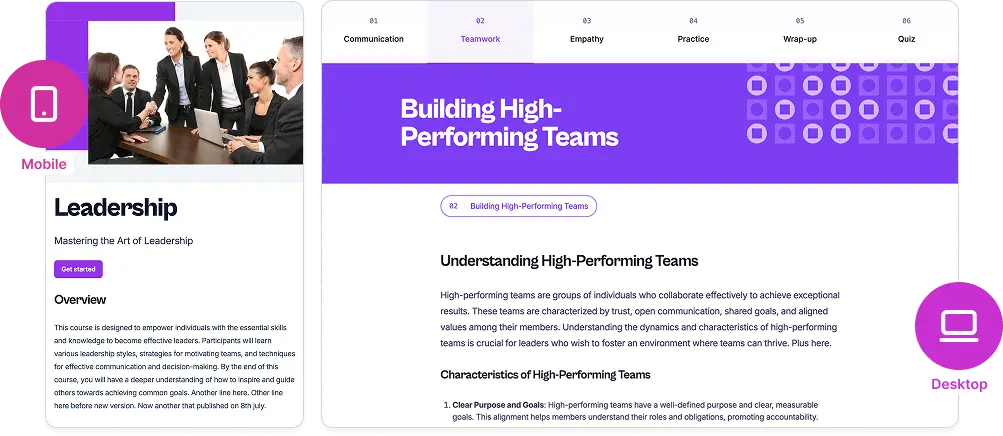
LearningStudioAI is course creation software for people who need to create online courses without a dedicated instructional design team: L&D and HR teams, corporate trainers, consultants, coaches and educators. It runs in the browser, starts from a topic or your own documents, and ends with a course that is ready to publish.
Every course exports as a SCORM 1.2 or SCORM 2004 package for your LMS, or goes out as a share link that reports completion, time spent and quiz scores per learner, no LMS needed. Use it as an online course creator for a single workshop, or as the online course builder behind a full onboarding program.
Free to sign up and try the editor. AI course generation and the public API require a paid plan, starting at $39/month. Compare plans.
Guided course creation, step by step
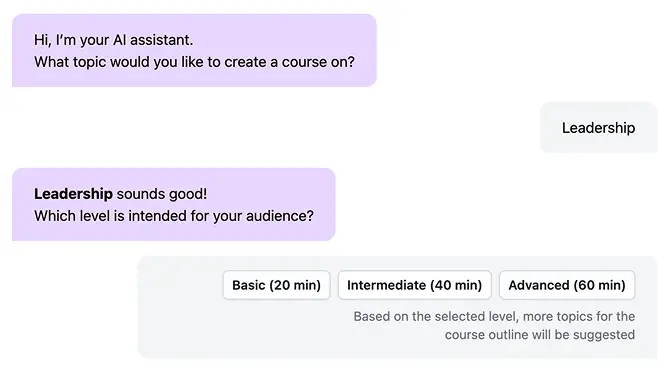
Just start by telling what your course is about. Our AI assistant guides you through every step, from defining topics to choosing your course format, quizzes, and recaps.
Turn your documents into courses
Upload a PowerPoint, Word, PDF, or text file — and our AI transforms your material into a structured course, saving hours of manual work.
See how to convert a PDF into a course.

Enhance and expand your course with AI
Built-in assistant, improves clarity, enrich content, and even grow your course with new sections automatically suggested based on context and learning flow.
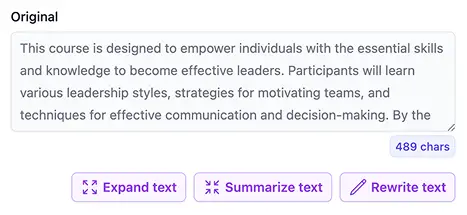
Edit with AI
Expand explanations, summarize long passages, or rewrite text for better tone and readability — all in one click.
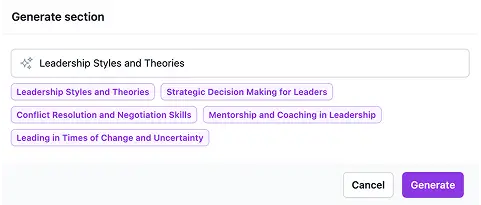
Add new section with AI
Let AI suggest and generate a complete new section that fits seamlessly into your course structure.
Bring your course to life with rich media
Make your lessons more engaging by adding videos, audio, and images anywhere in your course.
Video
Add videos from YouTube, Vimeo, and other streaming platforms, or upload directly.

Image
Upload your images or search for royalty-free visuals without leaving the editor.
Audio
Upload a file, record directly from your microphone, or use text-to-speech.
Share, track, or export your course anywhere

Share
Instantly share a link on WhatsApp, Telegram, LinkedIn, X (Twitter), or Facebook — or simply copy the link to send it anywhere.
Track
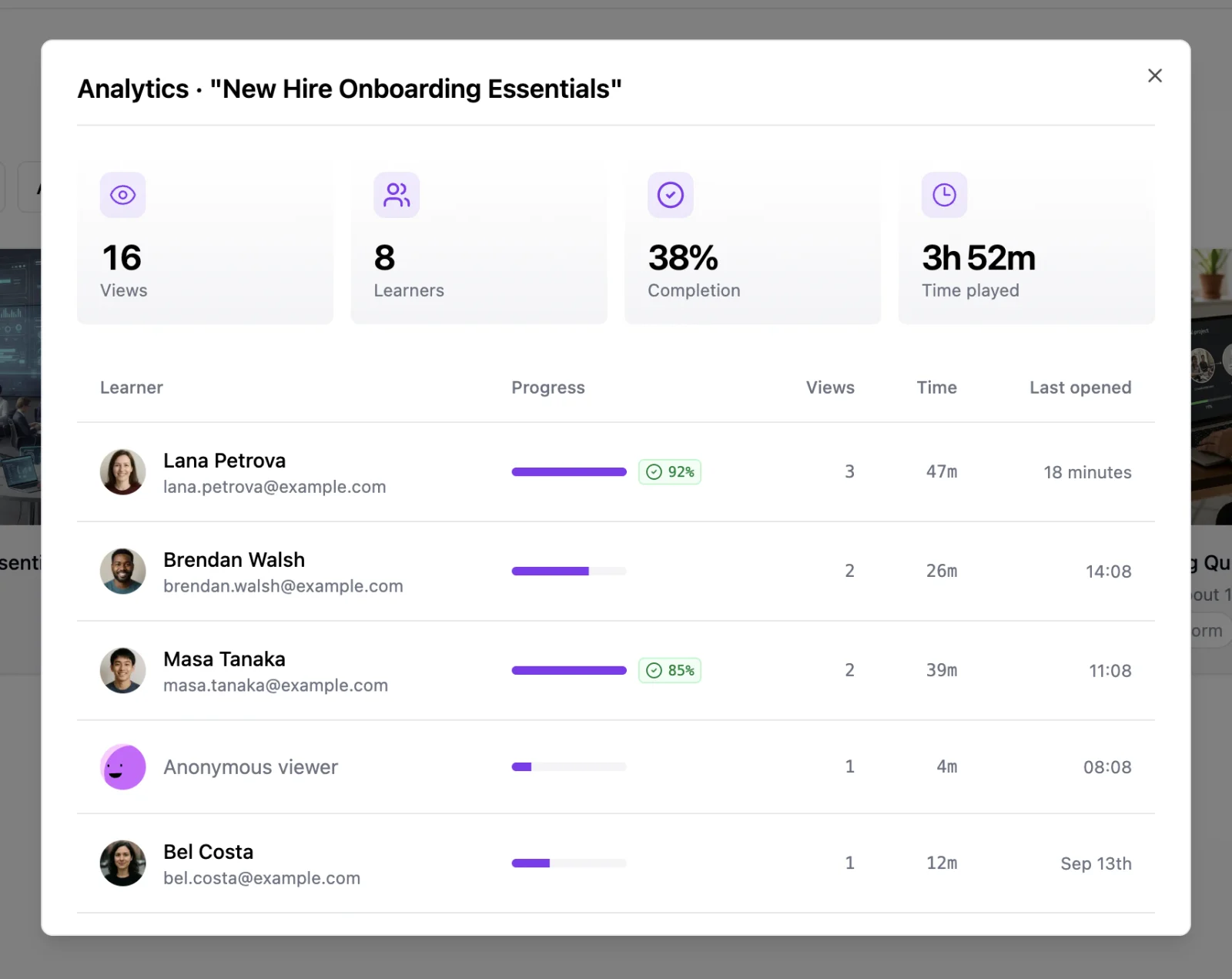
See who finished. Every shared course gets an analytics view with views, completion rate, time spent, and quiz scores per learner. Ask learners to identify themselves to see names and emails.
Download
Export your course as a PDF or SCORM package in one click. Perfect for uploading to your LMS or archiving offline versions. Build yours with the SCORM course creator.
Built for every kind of course creator
Whether you teach, train, or sell knowledge, LearningStudioAI adapts to your goals — giving you a faster, smarter way to create impactful learning experiences.
Universities & Educators
Convert your academic content into structured digital courses effortlessly — perfect for LMS distribution and distance learning.
Course Creators & Edupreneurs
Create complete online courses with AI-generated lessons, quizzes, and visuals — ready to sell or publish anywhere.
Corporate Trainers & HR Teams
Quickly build engaging onboarding or compliance courses — trackable, professional, and easy to update.
LearningStudioAI at a glance
- What it is
- LearningStudioAI is an AI course creator and eLearning authoring tool. It turns a topic, a PDF, or a document into a complete online course with lessons, quizzes, images, and text-to-speech narration, then publishes it as a shareable link that tracks each learner's completion and quiz scores without an LMS, or exports it as a SCORM package for any LMS.
- Who it's for
- Built for L&D and corporate training teams, educators, coaches, and course creators who need finished, publishable courses quickly rather than a blank-page editor.
- Learner analytics
- Learner analytics is built in and needs no LMS: the share link reports who opened the course, how far each learner got, active time spent, completion, and quiz scores per learner. A course setting can require learners to sign in before the course starts, so the owner knows exactly who finished. See how learner analytics works.
- Outputs
- Every course can be shared as a link, exported as SCORM 1.2 or SCORM 2004 for any LMS, or downloaded as a PDF. There is no HTML or xAPI export. Courses stay editable in a block-based editor after generation. Learn more about SCORM export.
- Languages
- Courses can be generated in 20 languages, including English, Spanish, Portuguese, French, German, Italian, Dutch, Polish, Japanese, Chinese and Arabic. Text-to-speech narration is available in 9 of them, with male and female voices. See narration voices.
- Accounts
- Authors sign in with Google or with email and password. Plans are per account, not per seat; there is no team workspace, SSO or SAML. Learners never need an account unless the author turns on the sign-in gate.
- Pricing
- Free to sign up and try the editor. AI course generation and the public API require a paid plan, starting at $39/month. See plans.
- Developers
- A REST API and webhooks create and export courses programmatically. Read the API docs.
AI course creator FAQ
- What is an AI course creator?
- An AI course creator turns a topic or a document into a structured online course. LearningStudioAI writes the outline, lessons, quizzes, images and text-to-speech narration, and you edit the result in a block-based editor before publishing.
- How do I create a course using AI?
- Type a topic or upload a PDF, PowerPoint, Word or text file. Review and adjust the outline the AI suggests, generate the course, then edit any block, add quizzes, images or narration, and publish it as a share link, a SCORM package or a PDF.
- Which files can I turn into a course?
- You can upload DOC, TXT, PPT or PDF files, up to 60,000 characters per document on Starter, 240,000 on Pro and 500,000 on Enterprise.
- Can I export my course as SCORM?
- Yes. Courses export as SCORM 1.2 or SCORM 2004 packages for any compliant LMS, such as Moodle, TalentLMS or Docebo. You can also download a PDF or share a link.
- Can I see who completed my course without an LMS?
- Learner analytics is built in and needs no LMS: the share link reports who opened the course, how far each learner got, active time spent, completion, and quiz scores per learner. A course setting can require learners to sign in before the course starts, so the owner knows exactly who finished.
- Which languages are supported?
- Courses can be generated in 20 languages, including English, Spanish, Portuguese, French, German, Italian, Dutch, Polish, Japanese, Chinese and Arabic. Text-to-speech narration is available in 9 of them, with male and female voices.
- How much does it cost?
- Free to sign up and try the editor. AI course generation and the public API require a paid plan, starting at $39/month. Plans are per account, not per seat, and you can cancel anytime.
More questions? See the full FAQ.