You've got a slide deck, a document full of useful explanations, and perhaps a few recordings. The material is ready to teach, but publishing it raises a different set of questions: where will learners open it, what happens on a weak connection, and how will you know whether anyone learned anything?
Publishing a course online is a release process, not an upload task. Choose the delivery format first, build a measurable learning sequence, and test the actual files learners will receive. Then use their progress and assessment results to decide what to fix.
Table of Contents
- Match the route to the learner - Create the learning path - Add evidence that learners can apply it - Keep a practical provenance record - Resolve policy conflicts before release - Test the complete learner journey - Add a connection-resilience gate - Release browser-based delivery - Release downloadable and LMS versions - Turn participation into a diagnosis - Revise a specific weakness - A practical five-day pilotChoose the Right Publishing Format for Your Learners
Publishing formats compared
| Format | Best for | Learner tracking | Needs an LMS | Main limitation |
|---|---|---|---|---|
| Hosted share link | Fast launch to a broad audience | Platform analytics where the host provides them | No | Requires the host platform to stay available |
| Website embed | Course inside an existing site or blog | Host-player analytics and configured site tracking | No | Learners must reach the host page |
| PDF download | Offline reading and slow connections | None built in | No | Graded quizzes and playable video don't carry over |
| SCORM 1.2 or 2004 package | University or corporate LMS delivery | Completion and scores sent to the LMS | Yes | Must be tested in the target LMS before release |
SCORM makes sense when an institution needs learning records inside an existing learning management system. Moodle, TalentLMS, and Docebo are examples of LMS destinations, but a successful export isn't proof of a successful deployment. Use this beginner's guide to SCORM and eLearning standards to understand the package's role before choosing the export.
Match the route to the learner
Say a university lecturer must return completion and assessment scores to the institution's LMS. SCORM is the sensible starting point because the gradebook requirement determines the delivery route.
A coach sending a workshop to a mailing list has a different problem. A hosted link gives subscribers direct access, while a downloadable PDF lets someone continue reading when their connection drops. The PDF should include the instructional content and practice questions, not just a cover page pointing back to streaming video.
Connectivity deserves that attention: a 2025 UNESCO-UNEVOC survey of 4,268 young people in 128 countries found that 24% lacked reliable internet access or suitable devices. That's a reason to test delivery conditions, not an argument against multimedia.
> Practical rule: Publish a usable hosted course and a downloadable reading companion unless your learners' environment gives you a clear reason not to.
Keep both outputs tied to the same master content so corrections don't become separate rewriting jobs. A PDF can preserve explanations, diagrams, and exercises, but it can't replace interactive grading or video demonstrations.
Before committing, answer these questions:
- Existing access: Where do learners already log in?
- Reporting requirement: Do scores need to reach a gradebook?
- Connection constraints: Will learners need to study offline?
Build a Publishable Course from Your Material
A source document follows the logic of its original purpose. A policy manual explains rules; a presentation supports a speaker; neither automatically gives an independent learner a clear path through practice and feedback.
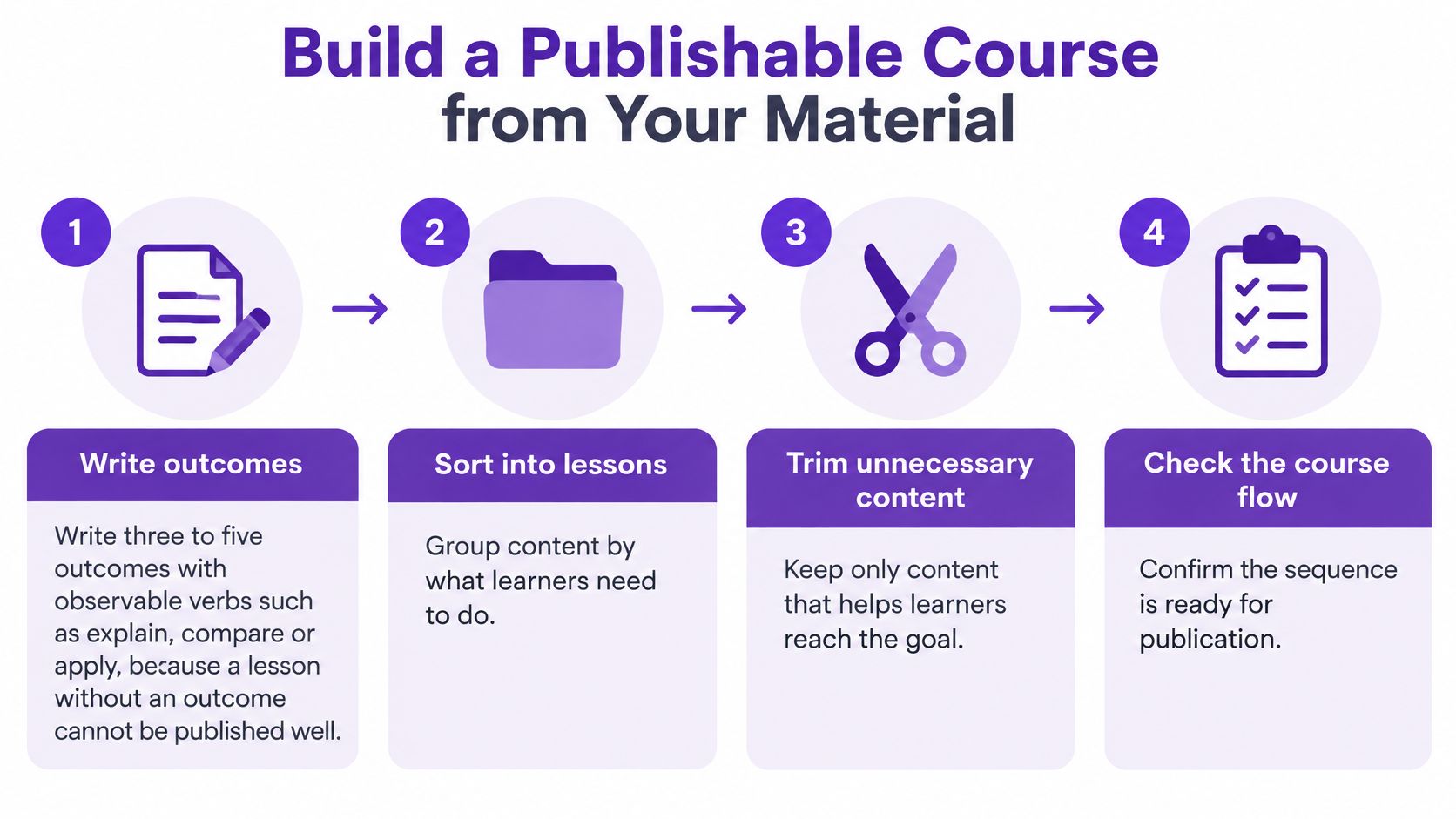
Use this routine to turn reference material into instruction.
Create the learning path
1. Start with observable outcomes. You can assess whether someone can explain, compare, or apply something; you can't directly assess whether they understand it. Write a short outcome list, such as comparing acceptable and unacceptable expense claims or applying the approval process to a disputed receipt.
2. Because learners need prerequisites before applications, review the outline before generating the lessons. Upload your PDF, PowerPoint, Word, or text document, or enter a topic, then reorder the proposed chapters around what learners need to do rather than the source file's headings.
3. Give each lesson a manageable task. Split a dense chapter where the learner's activity changes, not wherever a page happens to end. Time a realistic read-through and separate explanation, worked example, and practice when combining them makes the lesson difficult to follow.
4. Generic wording hides the decisions learners face, so replace it with field-specific examples. For an onboarding lesson, show a realistic handover note and explain what's missing rather than telling new hires to communicate effectively.
Add evidence that learners can apply it
5. Attach a graded check to the lesson outcome. If the outcome is choosing the right escalation route, ask learners to handle a scenario instead of recall a phrase from the reading. Write feedback explaining why the answer works and what makes the alternatives inappropriate.
6. Media should resolve a teaching problem, so add narration or video selectively. A software demonstration may need motion; a comparison of policy exceptions may work better as text and a table, with less download overhead.
7. Read the complete course in learner order. Follow every instruction, attempt every question, and mark places where you need information that hasn't appeared yet. Remove repeated introductions and repair abrupt jumps before adjusting decorative details.
Finish with an outcome-to-assessment map. Put each outcome beside its lesson and matching assessment question; an empty assessment cell means you haven't established how you'll check that outcome.
Keep the learner-facing promise equally precise. If you're planning a paid launch, FOMOchat's resource on how to build a course marketing funnel can help connect promotion to enrollment, but write that promise based on the outcomes you can teach and assess. Don't advertise a transformation that the lessons merely describe.
Disclose AI Use Before Learners See the Course
AI policy affects learner trust, not just institutional approval. A learner may reasonably ask who checked an explanation, whether an example contains private information, or whether using AI on an assessment is permitted.
Don't answer those questions with a vague statement that the course was human-reviewed. Establish what was reviewed, by whom, and against which sources.
Keep a practical provenance record
- Disclose the role of AI: State in the opening lesson whether it helped draft explanations, generate images, or produce narration. Distinguish assistance from responsibility for the final content.
- Record human review: Keep dated approval notes identifying the reviewer and any specialist checks. A factual review and an accessibility review serve different purposes.
- Verify claims: Check factual statements against primary sources and confirm that you have permission to reuse uploaded text, images, and examples.
- Protect confidential information: Remove learner records, internal identifiers, and employer-sensitive material before using a generator.
- Explain assessment rules: Tell learners whether resources and AI assistance are permitted, how retakes work, and what counts as their own work.
- Schedule renewed review: Revisit generated material when policies or subject knowledge change, and check examples for factual and cultural bias.
Resolve policy conflicts before release
A convenient publishing workflow doesn't override an institution's rules. If the planned tool, disclosure, or assessment method conflicts with policy, send the policy owner a written description of the intended use and request a decision before launch.
That description should identify the content being uploaded, the information learners will submit, and the records you intend to retain. Keep the response with the release documentation so another course owner can understand the decision later.
> Could you explain how every lesson was produced to a learner who asks?
If the answer relies on assumptions about sources, permissions, or review, resolve those gaps before publishing.
Run an Accessibility Check Before Release
Accessibility is a release gate. A course isn't ready because its opening page looks readable or its hosted player works with a mouse.
The WCAG accessibility guide for eLearning organizes checks around WCAG 2.2 AA and the principles of perceivable, operable, understandable, and resilient content. Use those principles to test the learning experience, not just the editor.
Pre-release accessibility checks
| Element | What to check | How to test |
|---|---|---|
| Images | Concise alt text on every meaningful image | Inspect alt text in the editor and read the course with a screen reader |
| Video and narration | Synchronized captions and a text transcript | Compare captions and transcript against the audio for accuracy |
| Headings | Logical order that shows document structure | Scan the outline view for skipped or misused levels |
| Color | Meaning not carried by color alone | View the course in grayscale |
| Quizzes and buttons | Full keyboard operation with visible focus | Navigate using only Tab, Enter, and arrow keys |
| Zoom and mobile | Text stays usable when enlarged | Test at mobile width and enlarged zoom |
| Each output | Hosted, embedded, PDF, and SCORM checked separately | Retest every export after any change |
Test the complete learner journey
Begin with the outline and heading hierarchy, then inspect contrast and typography. Correct image descriptions, verify captions against the recording, and check that transcripts include the information needed to follow demonstrations. A transcript that omits an action shown on screen leaves a gap.
Next, move from entry to completion without a mouse. Watch for invisible focus, controls you can reach but can't activate, and quiz feedback that appears visually without being announced. Include learner-identification forms, error messages, and the final submission screen.
For recording workflows, MEDIAL's accessibility guide for university teaching teams is a useful companion when preparing captioned teaching videos. Review the surrounding instructions too: the common online course design mistakes guide can help you inspect whether learners know what to do next.
Test every output independently. A hosted player might pass keyboard testing while its PDF loses image descriptions during export. An embedded video without captions can exclude a deaf learner even when the rest of the page is accessible.
Record defects as blocks learning, slows learning, or cosmetic. Fix blockers first and retest the affected journey after exporting again.
Add a connection-resilience gate
Download the PDF over a throttled connection, disconnect, and confirm that it opens without the web player. Check that essential illustrations are included rather than loaded from remote locations.
Where permissions allow, prepare a captioned downloadable video copy and a transcript. Offer audio for lessons suited to listening, but don't make narration the only route to essential information.
Load the lightest web lesson on a slow connection and interrupt connectivity during a quiz. Learners should receive a clear message about submission status rather than assume an unsent answer was saved. Ask a pilot learner to attempt this on a phone with a poor connection before approving release.
Publish Each Format Step by Step
Publish from an approved master version, not from whichever editor tab happens to be open. Keep draft assets separate from release files so you can identify exactly what learners received.
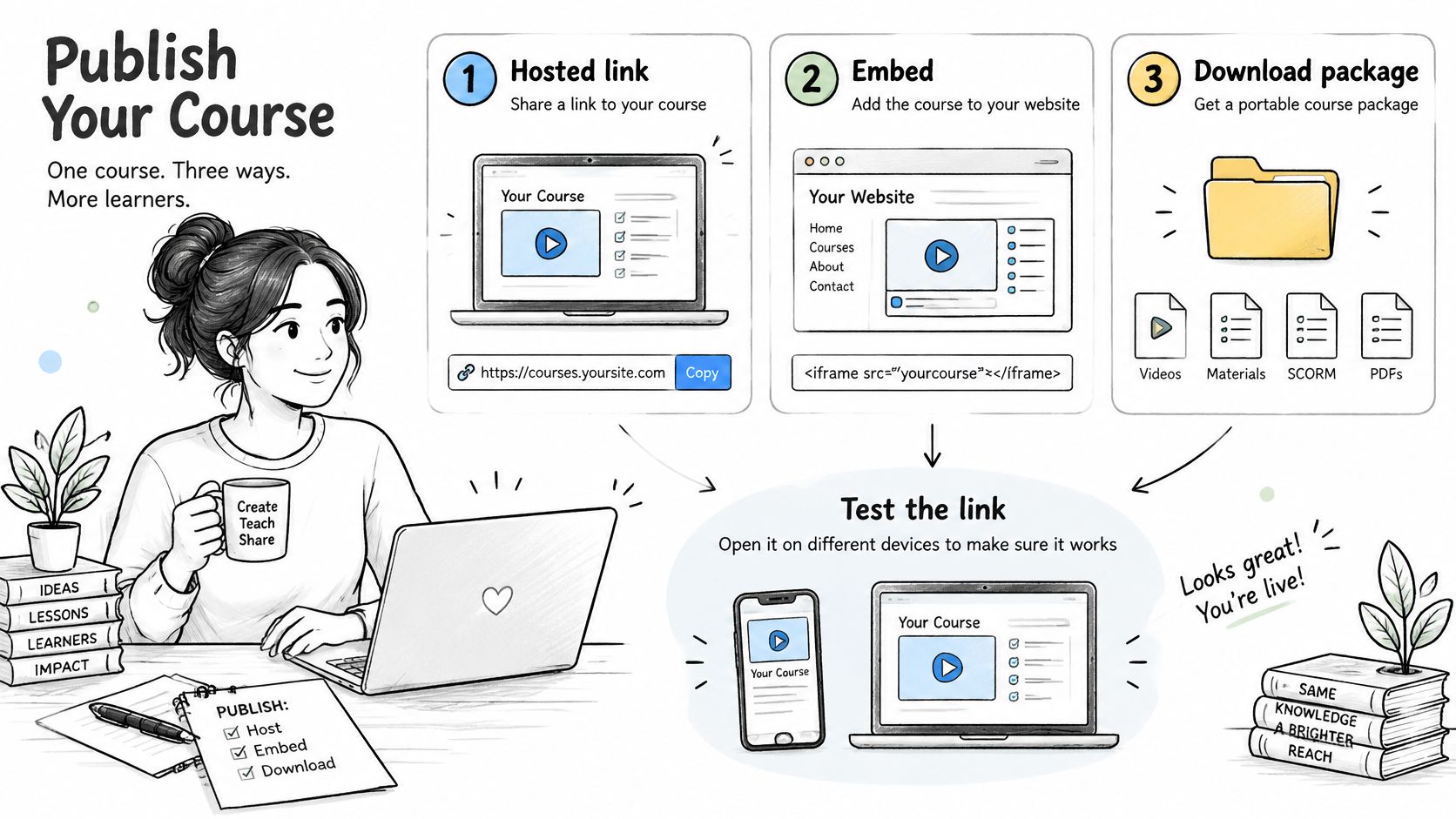
!A hand-drawn illustration showing three methods to publish and share an online course with students.
Release browser-based delivery
1. Publish the hosted link. Open the finished course, choose the sharing control, and copy the learner-facing address. Open it on a phone and a laptop without relying on your authoring session, then submit a quiz and return later to verify the expected progress-saving behavior.
Check the access boundary as well. If identification is required, confirm that the form works and that the learner sees the correct course afterward; if access is anonymous, don't assume you can reliably attribute every visit to a named person.
2. Place the embed on its destination page. Paste the embed code into the page editor's supported embed or custom-code area, beneath an introduction explaining the course's purpose. Publish the page and load it while logged out.
Confirm that the player renders, scrolling works on a narrow screen, and consent settings or site security controls don't block it. If you offer an alternative opening route, test that destination too.
Release downloadable and LMS versions
3. Export and inspect the PDF. Open the downloaded file, inspect its heading structure and image descriptions with a screen reader, and check page breaks around diagrams and exercises. Replace interactive assessments with clearly labeled practice questions and an appropriate answer or feedback section.
Remove instructions that only make sense in the player, such as selecting a button that doesn't exist in the document. Give the file a descriptive name that distinguishes it from an earlier release.
4. Export the SCORM package for the destination LMS. Match SCORM 1.2 or SCORM 2004 to the LMS configuration, upload the package into a test course, and launch it using a learner account rather than an administrator preview.
Complete the intended assessment path and confirm that the LMS records the expected score and completion status. Close and reopen the activity to test resume behavior, then inspect what happens after an unsuccessful attempt.
5. Maintain a release log. Record the version, publication date, format, tester, and approval status. Include a short change note so someone maintaining the course later can distinguish a wording correction from a revised assessment.
> An edited master course and an old exported package are different releases, even when their titles match.
A common maintenance slip is correcting the hosted course while leaving the PDF or LMS package untouched. Treat each affected export as a release task with its own verification, not an automatic consequence of saving the source.
Finish by sending the actual learner link to a colleague who hasn't seen the course. Ask them to start, complete an activity, leave, and return without coaching; their questions will expose instructions you've stopped noticing.
Track Results and Revise the Weak Lessons
Completion rates by course design
| Design feature | With feature | Without feature | Difference |
|---|---|---|---|
| Graded assessments | 59.1% | 42.4% | 16.7 percentage points |
| Scheduled delivery | 53.4% | 41.9% | 11.5 percentage points |
| Inline lesson discussions | 50.9% | 37.3% | 13.6 percentage points |
These are observational comparisons, not guaranteed effects. They don't establish that adding a quiz, deadline, or discussion will produce the same improvement in your course.
Turn participation into a diagnosis
Publish a minimum viable course that is complete enough to teach and assess its stated outcomes. Track views, active time, lesson progress, quiz scores, and completion, then locate the largest loss of learners between meaningful checkpoints.
Use the learner analytics guide to course completion to plan which participation records you'll inspect. Verify SCORM reporting in the destination LMS before inviting a broad audience, especially when completion depends on both viewing content and passing an assessment.
Interpret patterns as questions rather than verdicts:
- Early exits: Is the opening objective clear, does access work, and do learners recognize the course as relevant?
- Long activity with little progress: Are learners practicing deliberately, struggling with instructions, or leaving the page open?
- Abandonment at a quiz: Does the question assess the stated outcome, and is the response mechanism usable?
- Completion with weak scores: Can learners finish without demonstrating the skill you intended to teach?
Revise a specific weakness
Set a review trigger before interpreting results. For example, decide that a lesson deserves inspection when its pre-quiz abandonment is noticeably worse than neighboring lessons, then investigate rather than deleting content immediately.
Choose a focused change: clarify the objective, shorten an explanation, add a worked example, or repair feedback. Record the hypothesis alongside the edit so the next comparison has a purpose.
Compare cohorts with similar audiences, enrollment sources, lesson lengths, and completion definitions. If you change all of those together, you won't know whether the lesson revision helped.
Keep offline learners in mind when reading dashboard totals. A missing web completion record isn't proof that someone ignored the downloadable material; use a follow-up task or learner feedback to understand that part of the experience.
Launch Your First Course Link This Week
Start with a small pilot rather than a full catalog. A limited release lets you test access, instruction, and reporting without asking a large audience to work around unfinished decisions.
A practical five-day pilot
- Day one: Choose the delivery route and build two lessons, each with a stated outcome and a graded check. Keep the scope narrow enough that you can review every explanation and answer.
- Day two: Run the accessibility gate and fix defects in severity order. Don't spend the session adjusting decorative spacing while a learner can't submit an answer.
- Day three: Publish the hosted link, test it on a phone and laptop, and invite five pilot learners. Give them a clear completion window and a way to report problems.
- Day four: Inspect their progress and assessment records. Note the lesson with the largest pre-quiz drop-off, and ask unfinished learners what interrupted them.
- Day five: Revise a specific weakness and record what changed, why you changed it, and what you'll compare next.
Your first action is to choose the learning task for the pilot. Start today, recruit the learners once the release checks pass, and treat their results as the baseline for later revisions, not a final judgment on the course.
---
LearningStudioAI brings editable course creation, hosted publishing, embeds, PDF downloads, and SCORM exports into the same workflow. Visit LearningStudioAI to turn your source material into a small pilot, test the learner-facing outputs, and publish a course you can improve from actual participation.